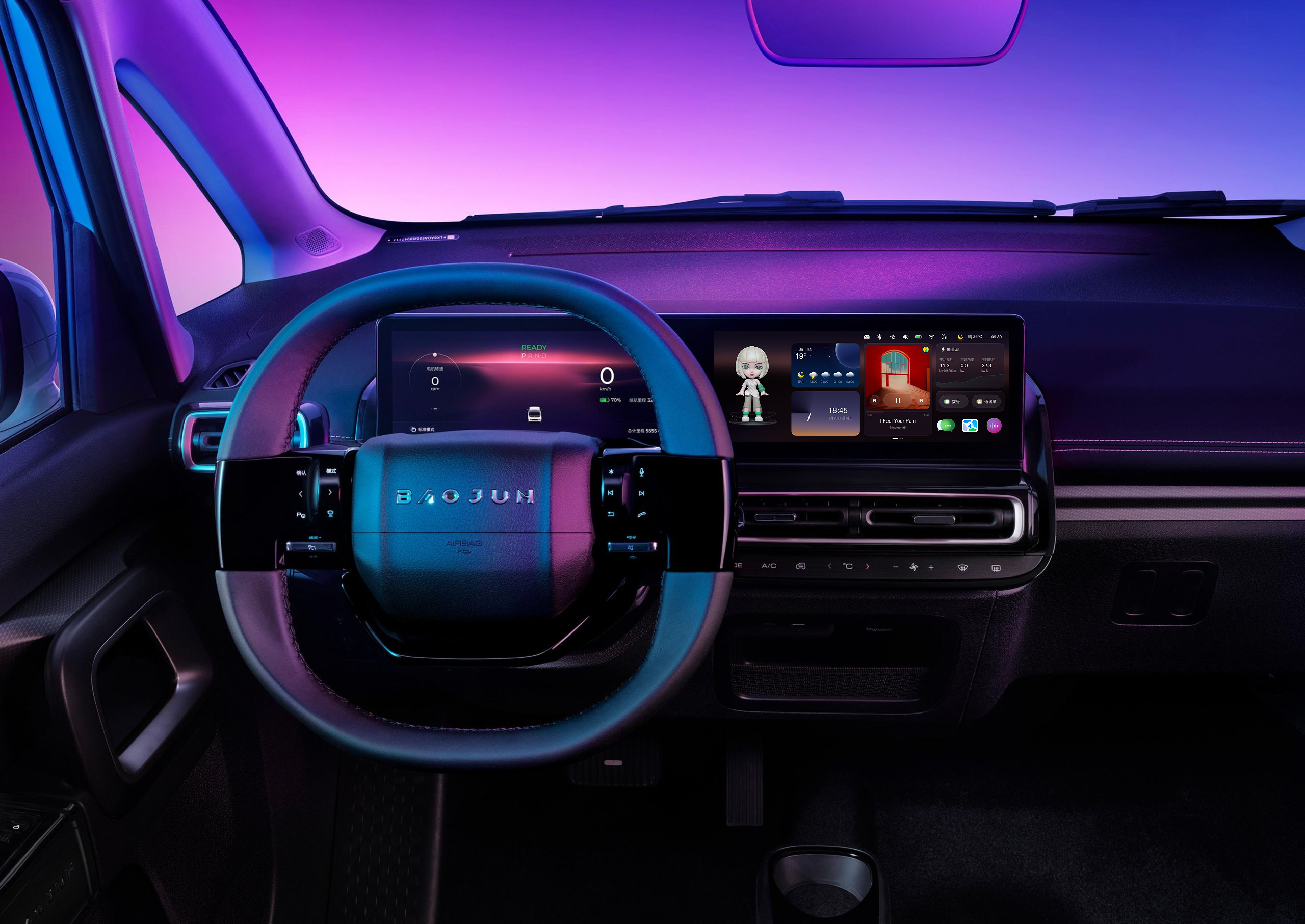
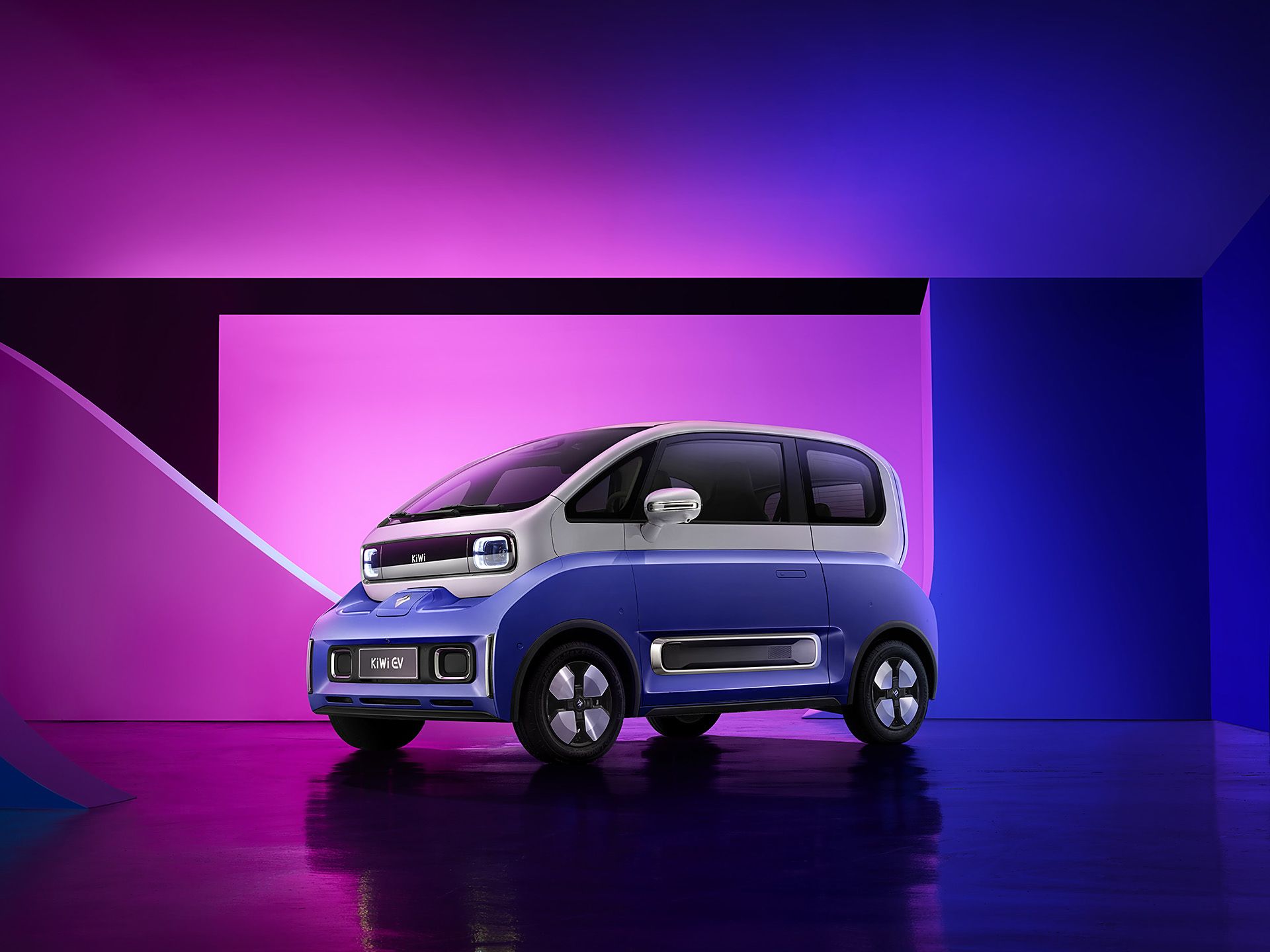
Kiwi EV: Full redesign of LingOS 2.0
01 Background
The 2023 Kiwi EV promised Gen-Z a "fun, trendy" urban driving experience. However, user satisfaction surveys showed users were deeply frustrated with the Kiwi EV's in-car system, LingOS1.0, and it was hurting sales. But SAIC-GM couldn't pinpoint why or how to fix it.
So they asked us to redesign the entire OS in 4 months without changing the fixed 10.25-inch hardware. Typically, this scope requires 12+ months.
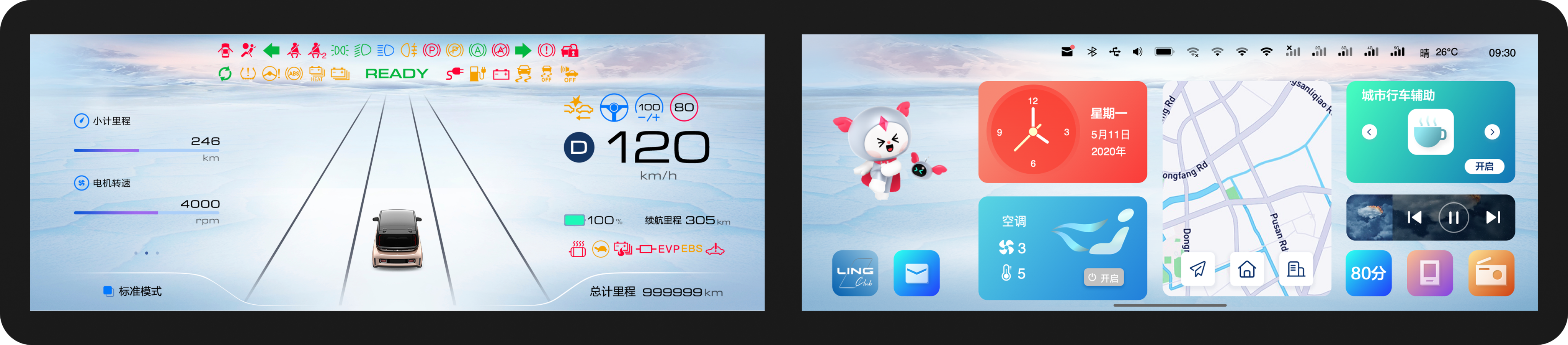
LingOS 1.0
LingOS 2.0
02 Three Critical Problems
Usability study surfaced the highest-impact gaps — both safety-relevant.
01 Dock in wrong place, wrong size, wrong density
The most-used controls were in the worst ergonomic position — too far right, icons too small, eight packed together. Root cause of basically every complaint.
SOLUTION:
- Cut from 8 icons to 4 — removed redundancy, prioritized by usage frequency
- Repositioned to center — explored vertical edge, floating, top-left, and others. Most failed. Picked center-bottom: lower engineering cost, preserved familiar mental model
- Tested rendering styles — the winner had the strongest silhouette weight, not the cleanest look. Peripheral vision picks up shape mass before detail. Flat outline tested worst.
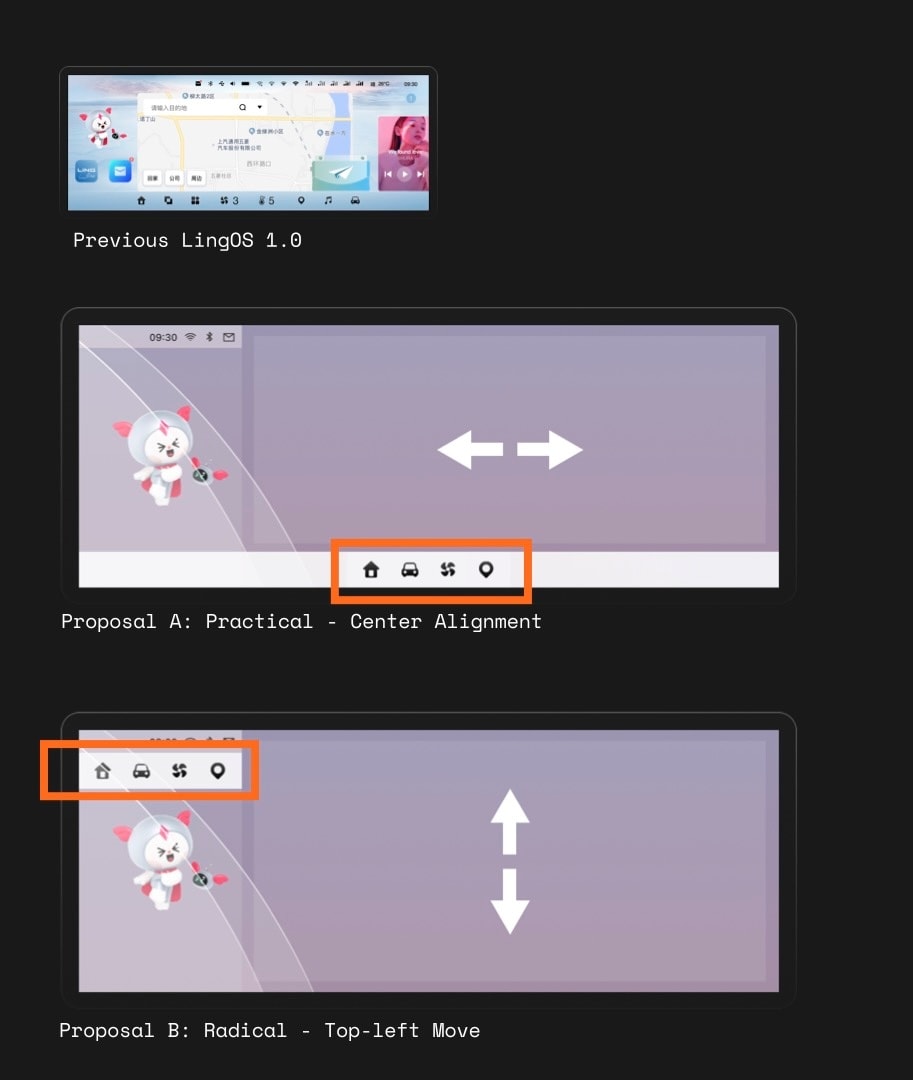
Dock Positional
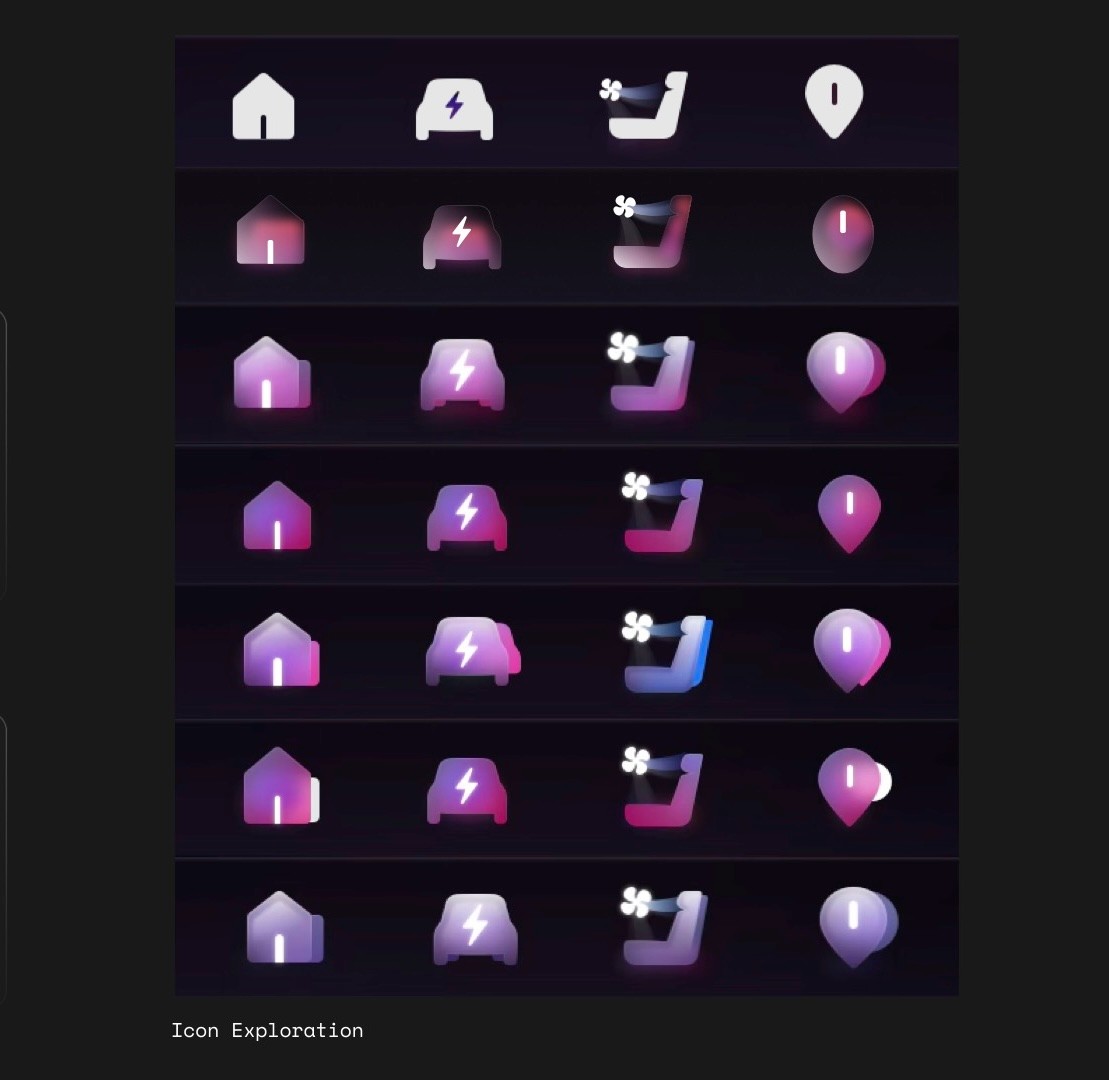
Dock Visual Exploration
02 Camera unavailable at cold start
You reverse out of a garage — but the camera won't come on for 2 minutes. Android needed that long to boot. Linux, which handles sensors, was ready in seconds.
Solution: dual-layer handoff. Linux renders raw camera feed immediately; Android UI fades in on top when ready.
SOLUTION:
Dual-phase handoff. Linux renders raw camera feed immediately; Android UI fades in when ready. Driver never waits. Transition invisible.
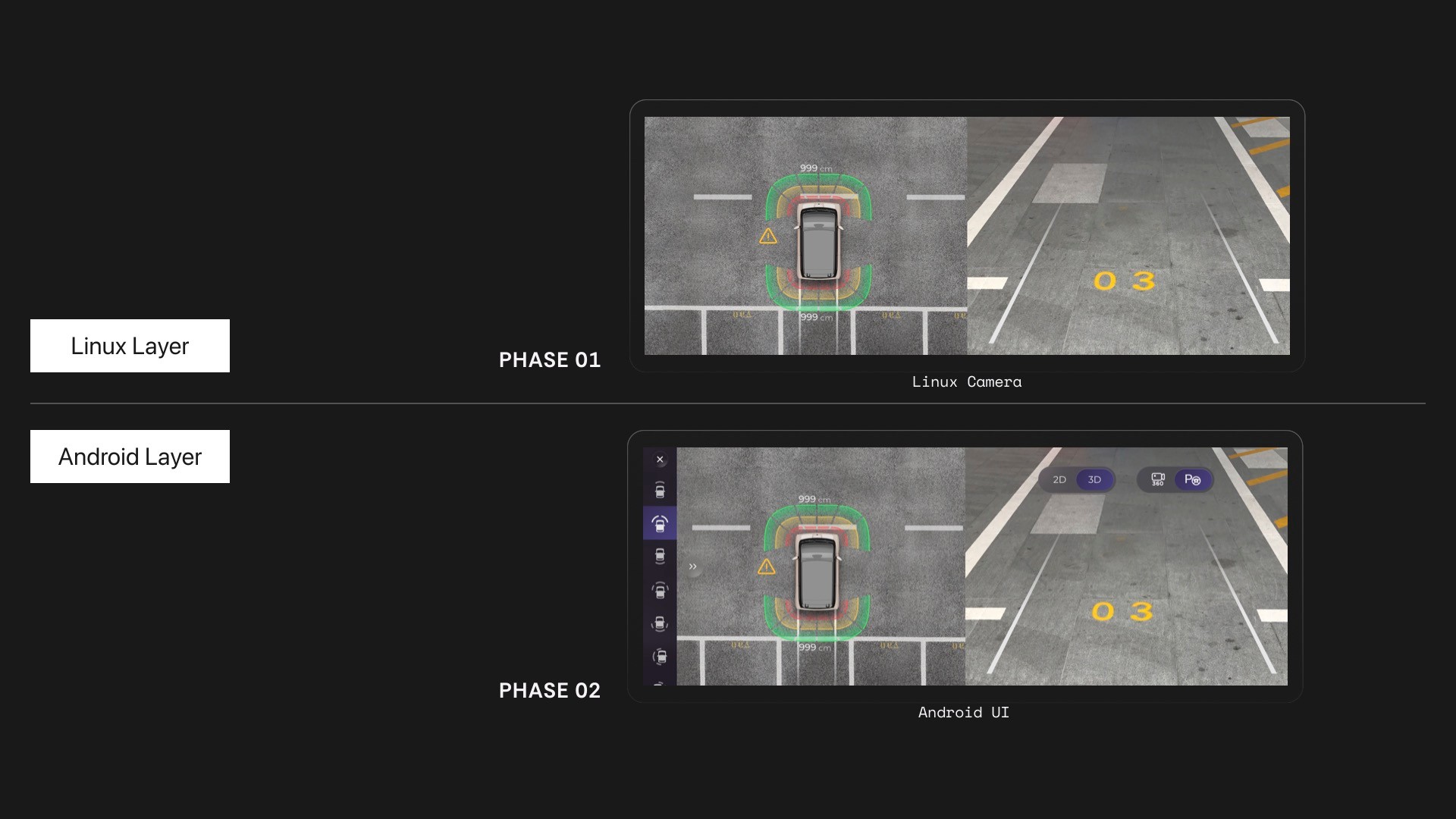
Camera live in ~3s via Linux handoff.
03 Finding music took 10+ seconds
Finding a song took 10+ seconds of looking away at highway speed. That's 300 meters blind.
SOLUTION:
- Merged mini player into the dock — switch tracks without entering the app
- Eliminated card layout — reclaimed 30% vertical space
- Replaced horizontal swipe with vertical infinite scroll — significantly reduced visual search time
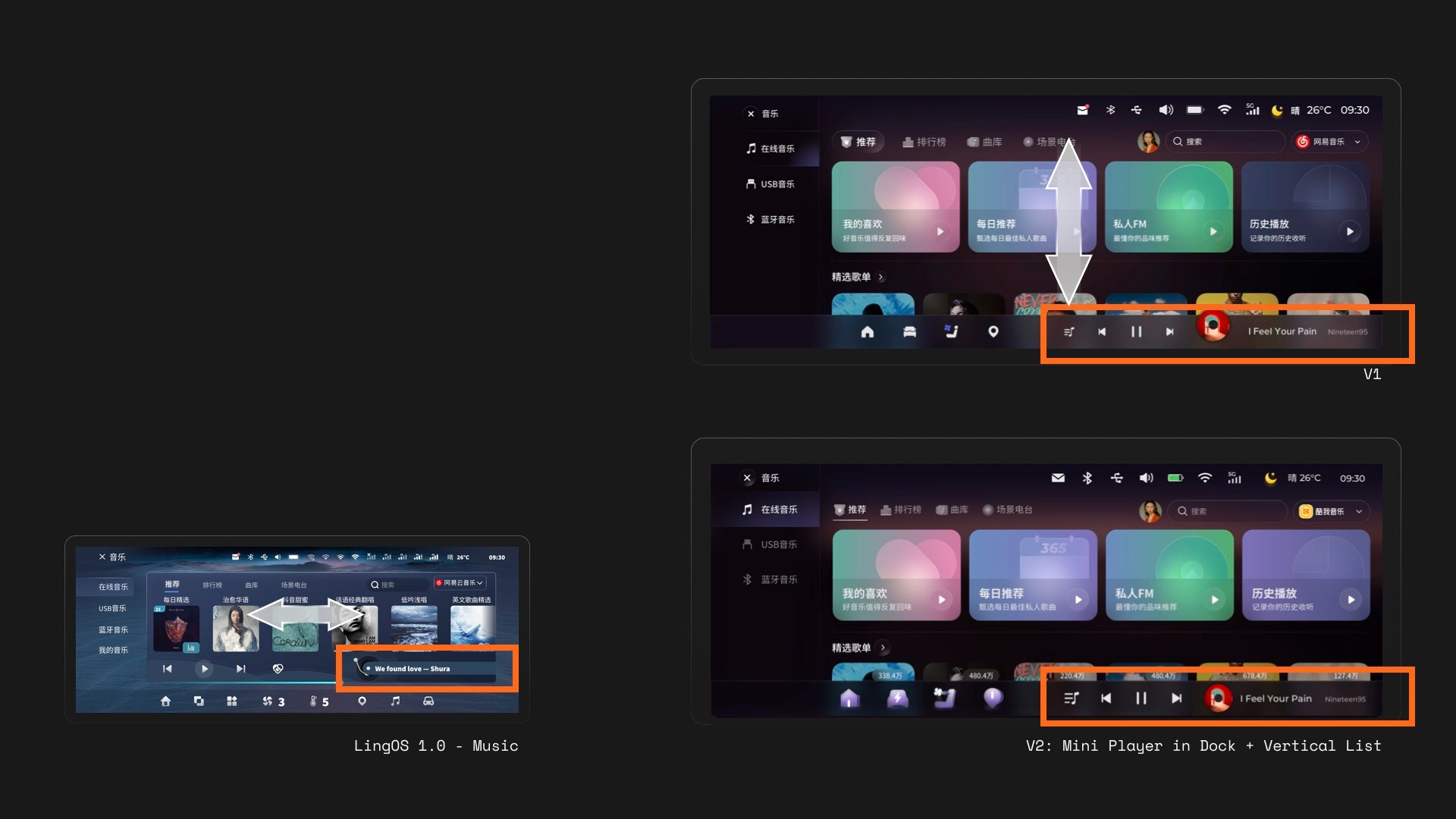
mini player in dock
03 Dual Desktop - a mental model, not a feature
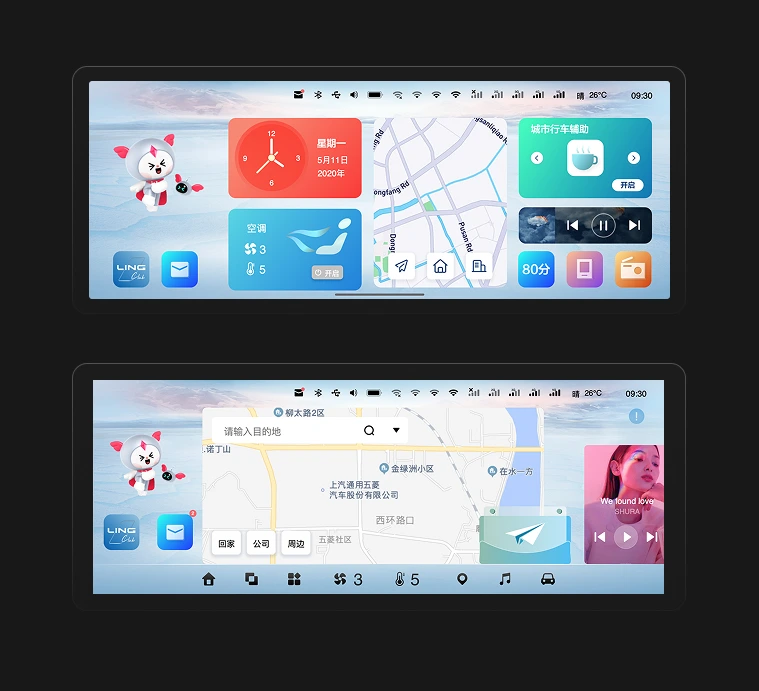
The KIWI's dual desktop concept – a widget desktop and a Card desktop – was a non-negotiable product requirement. Instead of challenging the constraint itself, I turned it into two intentional contexts.
LingOS 1.0 Dual Desktop
01 Defined two mental models
DESIGN CHALLENGE:
- What roles do the two desktops play?
- When do users need to switch between desktops?
SOLUTION:
Widget Desktop:
- "I just want to do one thing fast, then focus on driving."
- Merged all apps for daily high-frequency needs
Card Desktop:
- "My car and I are spending time together.”
- Introduced "Scenario Store" with cards like Camping, KTV
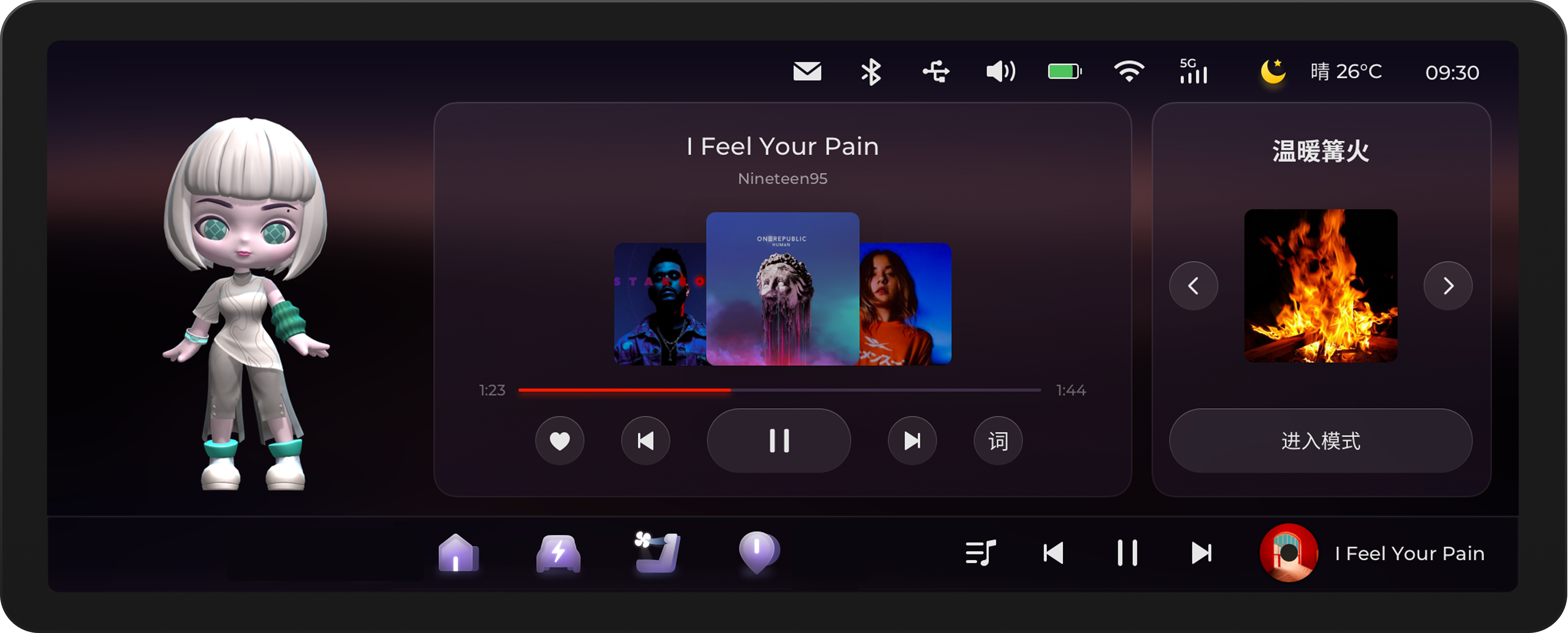
Card Desktop - Emotional scenarios
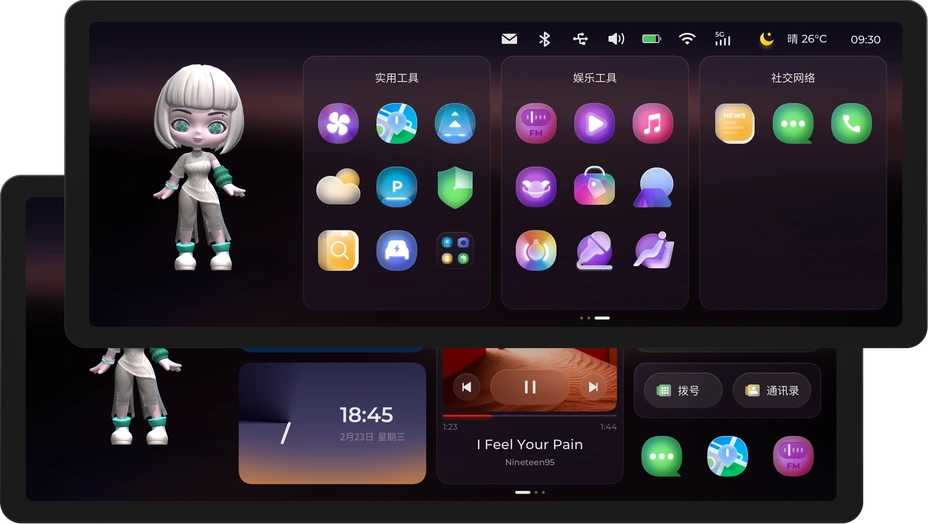
Widget Desktop - Maximum efficiency
02 Remove the biggest point of friction
Original touch area too tiny, interaction inconsistent. Explored 4-finger pinch (easy to trigger but steep learning curve, conflicted with map zoom). Landed on bottom swipe up / top swipe down with larger touch areas, plus voice.
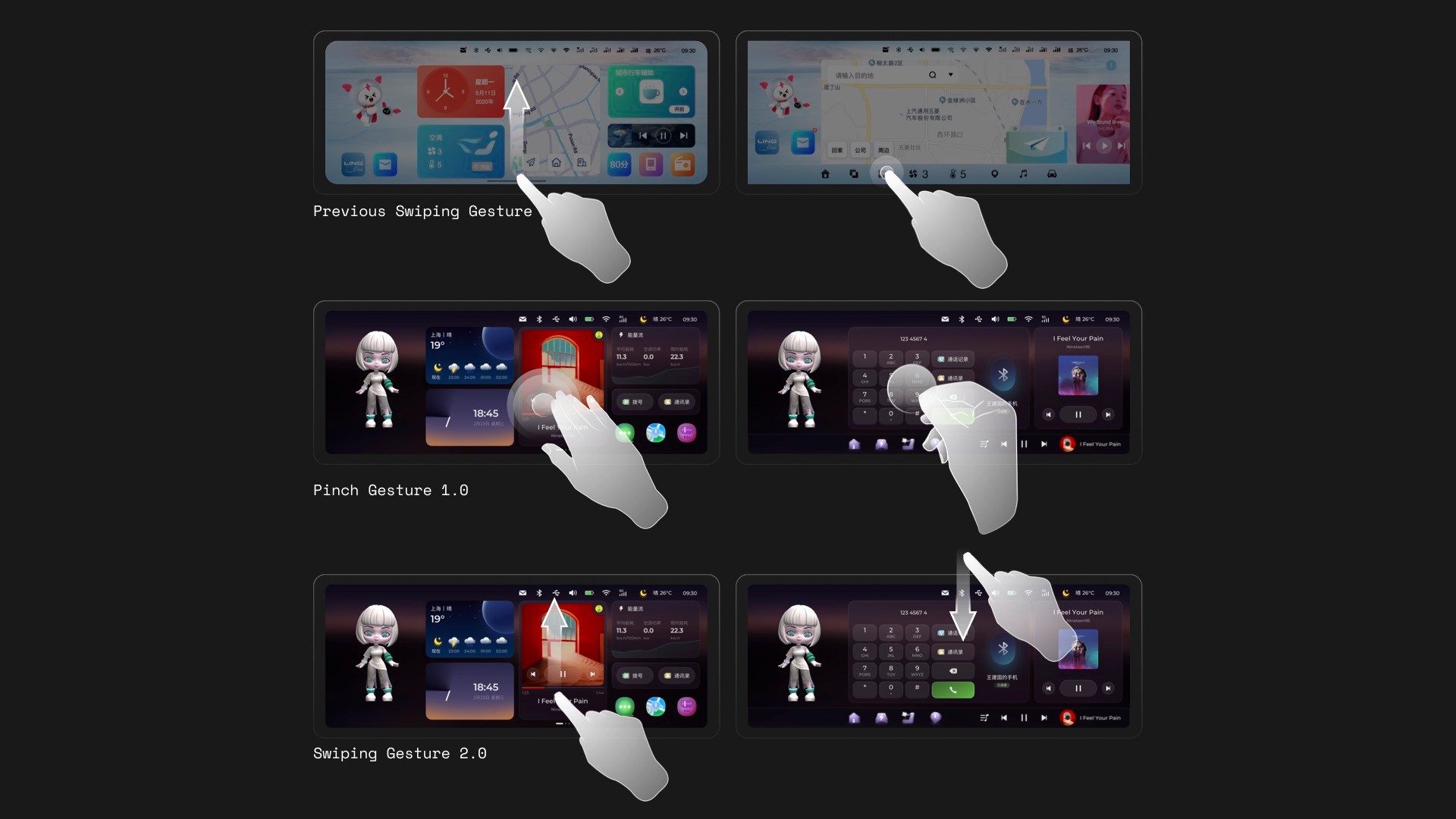
Redesigned the switch gesture
04 Visual system -The "Glance"
Color, shape, and motion before language. Every state readable in a half-second glance.
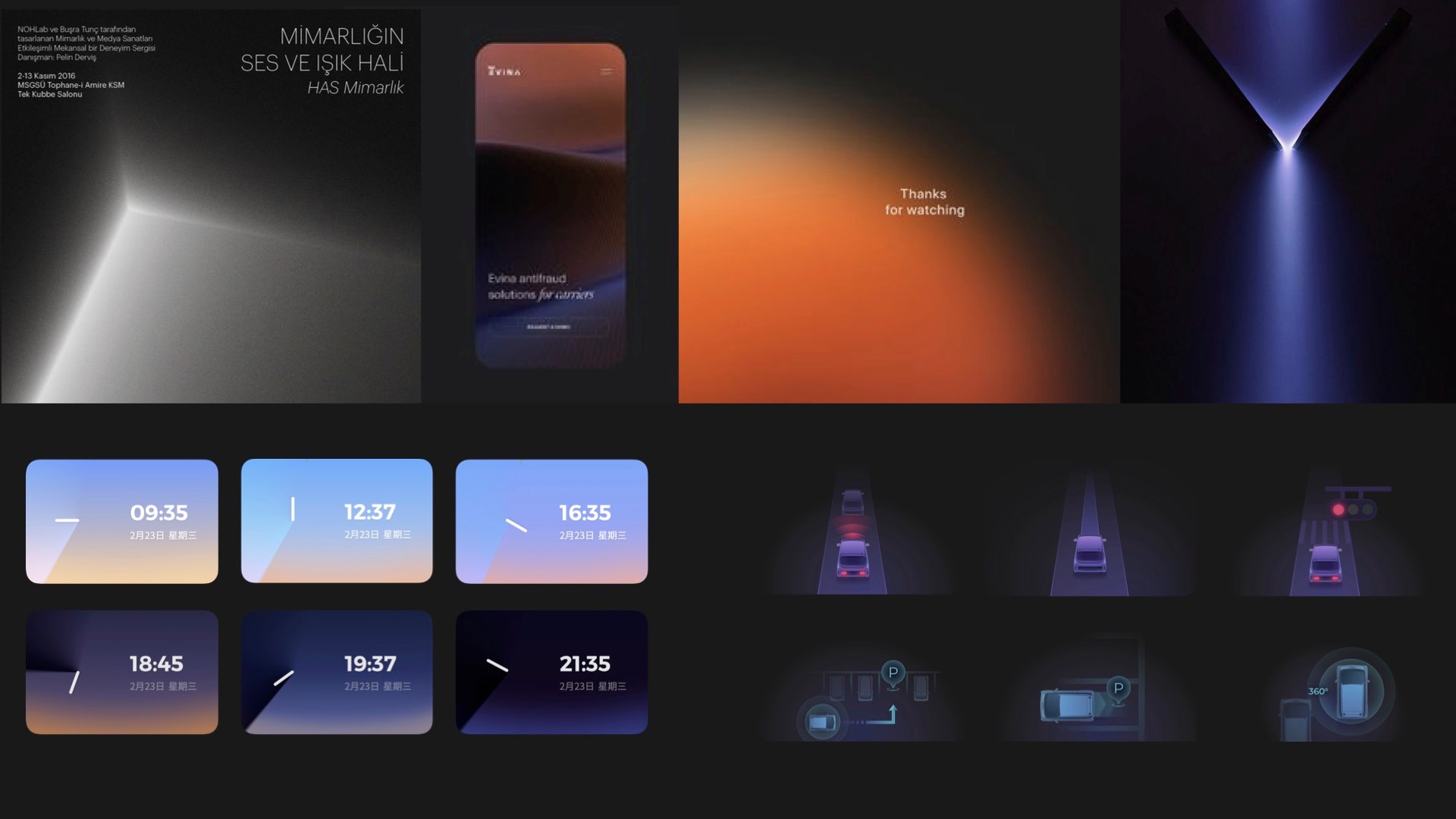
Inspired by LIGHT, I designed Time Card by time changing, ADAS Car settings, and so on.
05 Physical Buck Testing
Due to the 4-month development cycle not allowing multiple iterations on production vehicles, we partnered with Unity to build the Physical Buck (cabin simulator) for high-frequency prototype validation, differentiating parked vs. driving contexts.
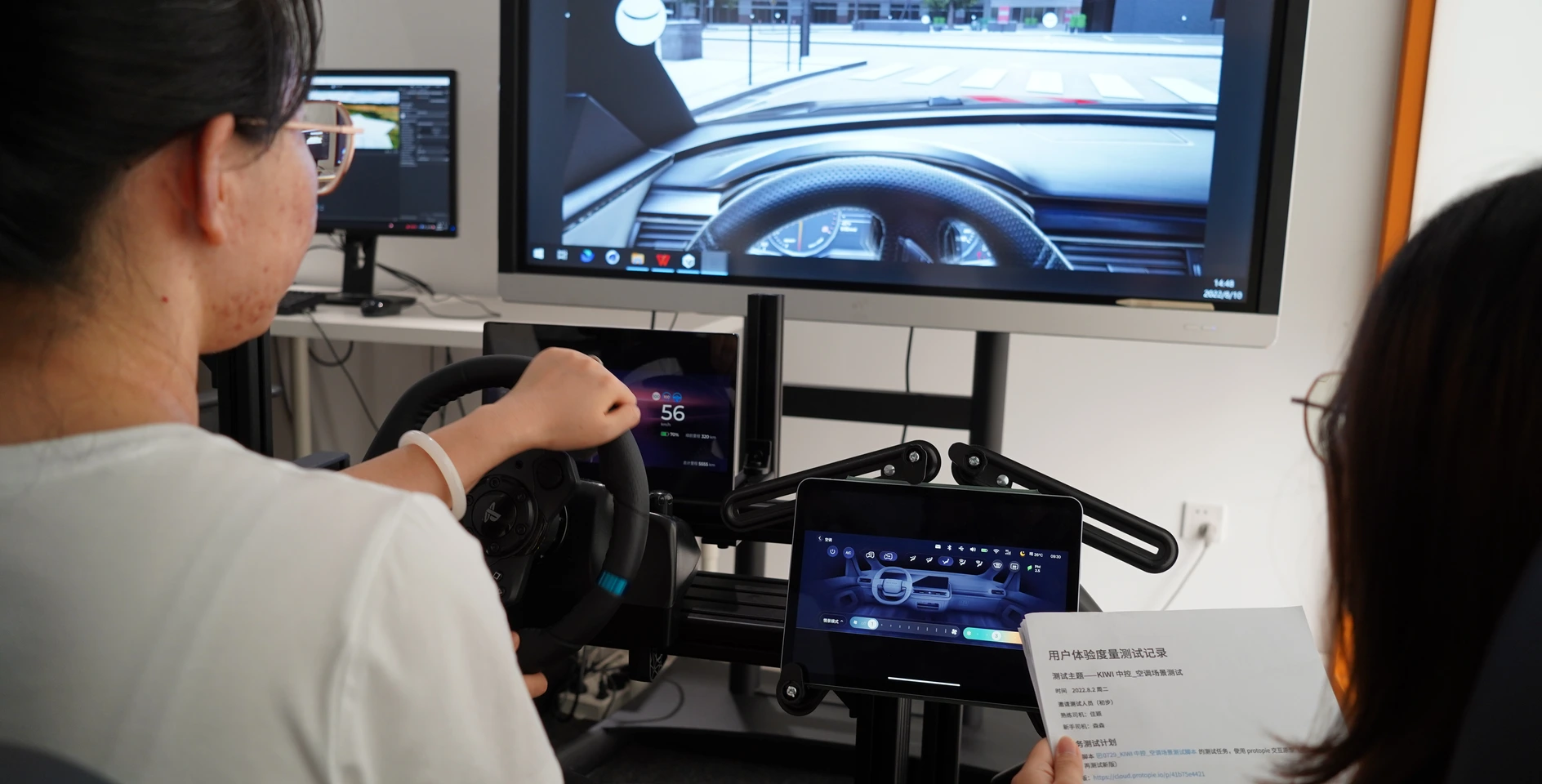
Buck Testing
↓56%
Glance time per task
↓32%
Task completion time
+37%
User satisfaction score
07 Scaling
Design System Deliverables:
- 400+ pages of components, guidelines, and documentation
- Comprehensive button & icon library
- Color system with day/night mode support
- Supported by multiple UI designer contractors
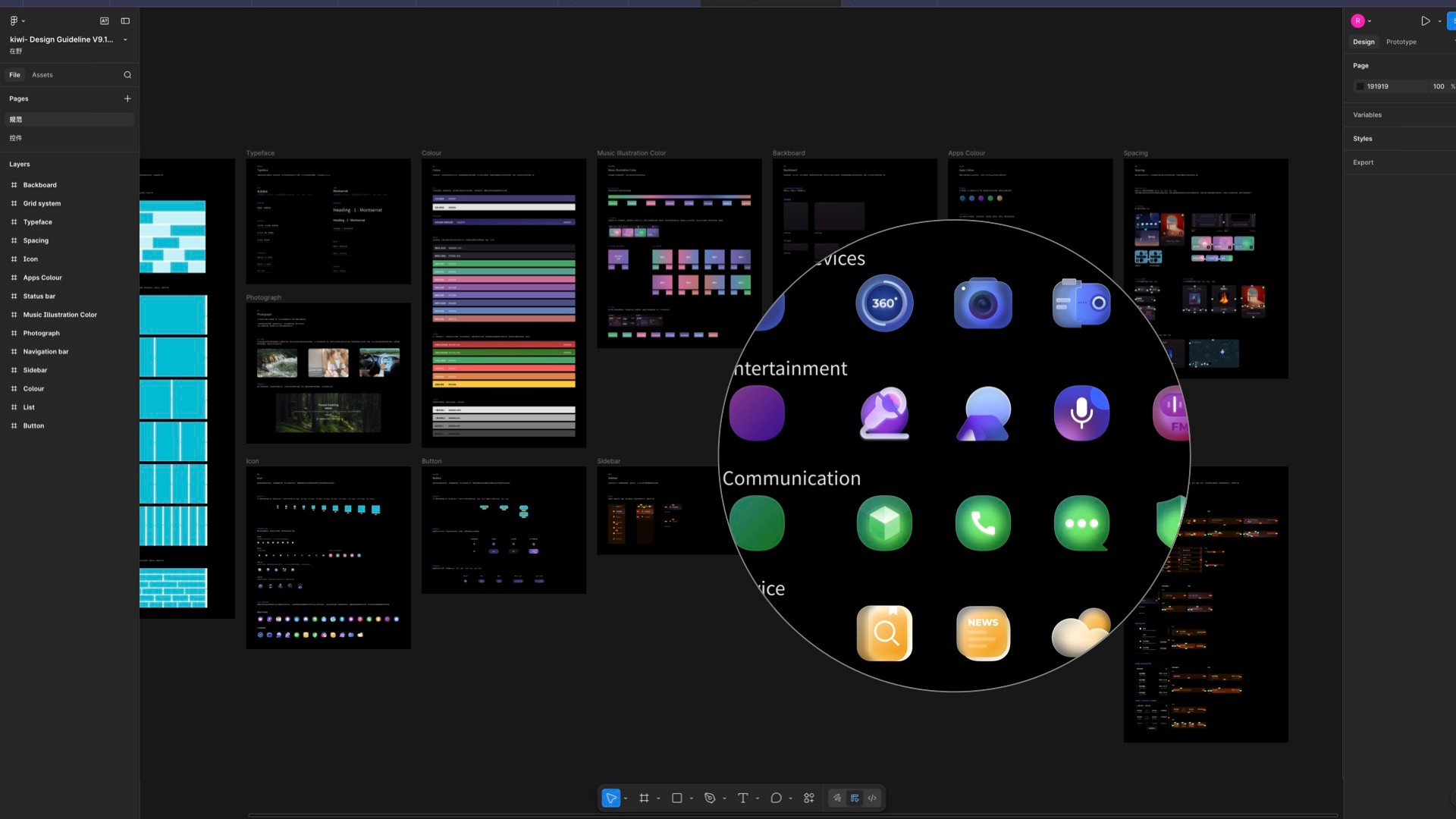
Buck Testing
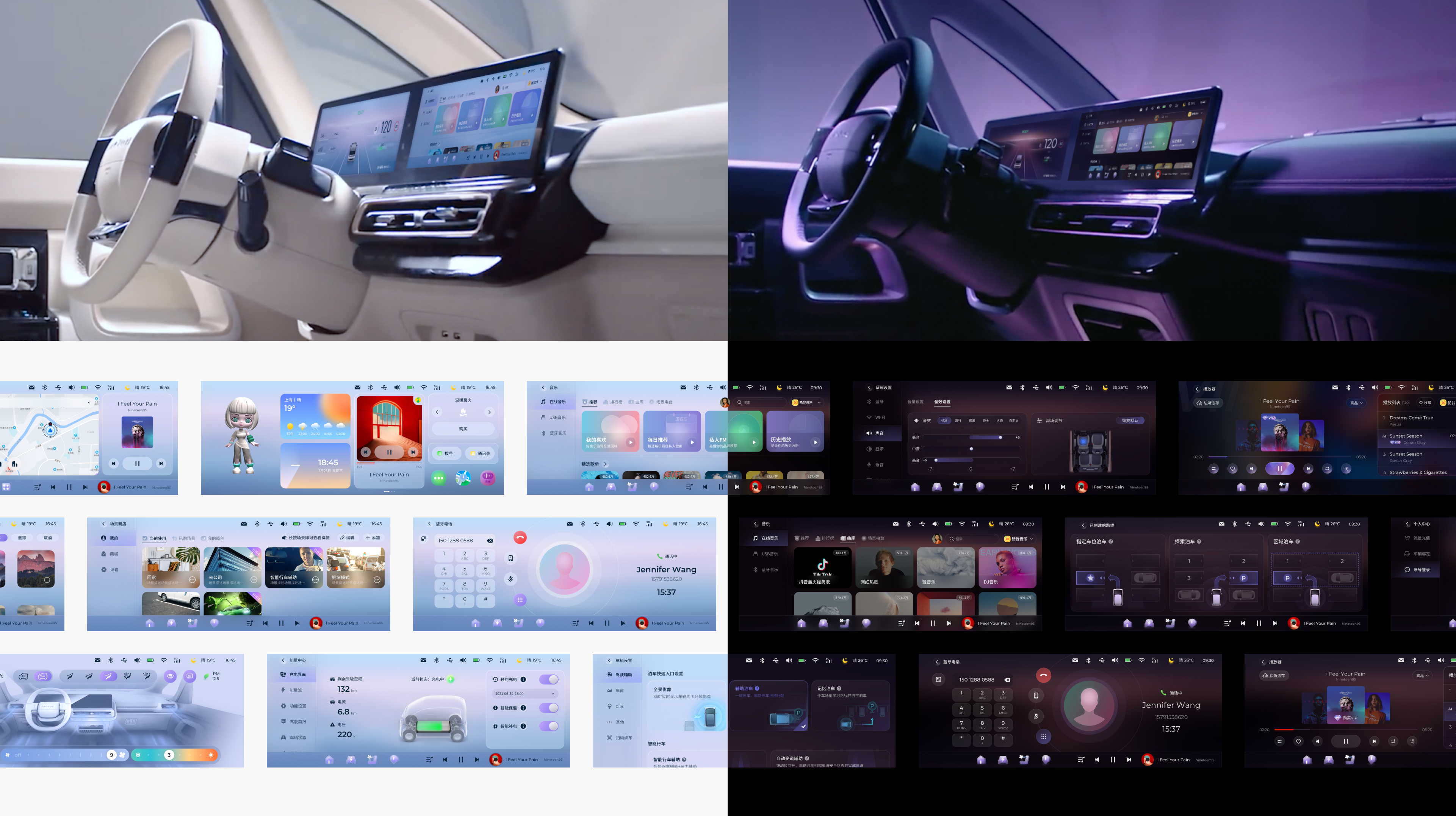
Buck Testing
08 Post-Lauch Adoption
- Scaled across 5 SAIC-GM vehicle model
- 3-year lifespan as SAIC-GM's OS standard
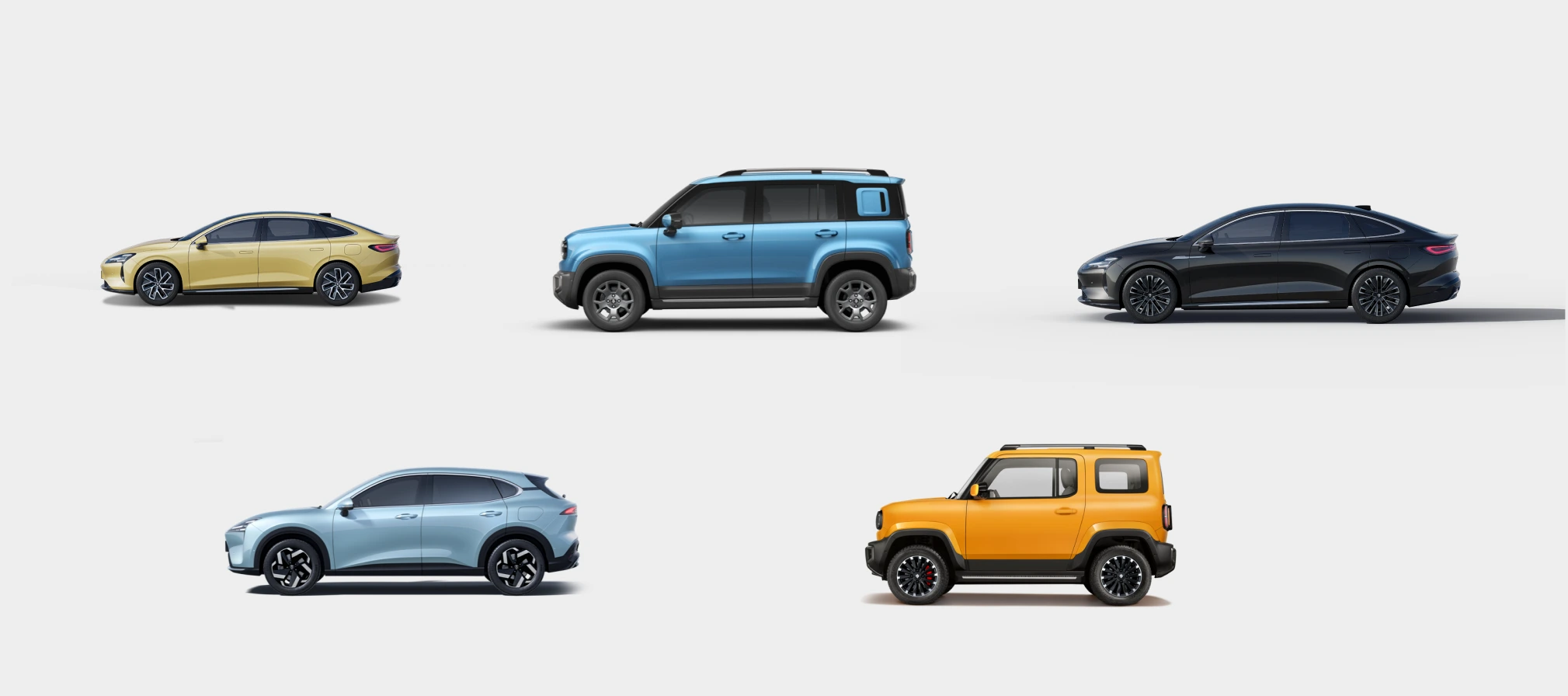
Reflection
What I learned:
As a senior designer, my value wasn't just delivering a UI—it was establishing a rational decision-making logic within organizational chaos, making design the core driver of product delivery.
The broader lesson:After wrapping, I built the Adaptive Testing Buck System as a reusable consultant product — so the infrastructure we invented for this project could keep working.
Kiwi EV: Full redesign of LingOS 2.0
IMPACT
+36.5% User satisfaction score
-56% Avg glance time per task
60k+Units sold post-launch5 models adopted
ROLE
End-to-end strategy & Visual Design
w/ a team of
1 Motion + 5 Graphic Designers
1 PM + 1 EPM3+ Engineers
CLIENT
SAIC-GM-Wuling Automobile
DURATION
4-month
01 Background
The 2023 Kiwi EV promised Gen-Z a "fun, trendy" urban driving experience. However, user satisfaction surveys showed users were deeply frustrated with the Kiwi EV's in-car system, LingOS1.0, and it was hurting sales. But SAIC-GM couldn't pinpoint why or how to fix it.
So they asked us to redesign the entire OS in 4 months without changing the fixed 10.25-inch hardware. Typically, this scope requires 12+ months.
LingOS 1.0
LingOS 2.0
02 Three Critical Problems
Usability study surfaced the highest-impact gaps — both safety-relevant.
01 Dock in wrong place, wrong size, wrong density
The most-used controls were in the worst ergonomic position — too far right, icons too small, eight packed together. Root cause of basically every complaint.
SOLUTION:
- Cut from 8 icons to 4 — removed redundancy, prioritized by usage frequency
- Repositioned to center — explored vertical edge, floating, top-left, and others. Most failed. Picked center-bottom: lower engineering cost, preserved familiar mental model
- Tested rendering styles — the winner had the strongest silhouette weight, not the cleanest look. Peripheral vision picks up shape mass before detail. Flat outline tested worst.
Dock Positional
Dock Visual Exploration
02 Camera unavailable at cold start
You reverse out of a garage — but the camera won't come on for 2 minutes. Android needed that long to boot. Linux, which handles sensors, was ready in seconds.
Solution: dual-layer handoff. Linux renders raw camera feed immediately; Android UI fades in on top when ready.
SOLUTION:
Dual-phase handoff. Linux renders raw camera feed immediately; Android UI fades in when ready. Driver never waits. Transition invisible.
Camera live in ~3s via Linux handoff.
03 Finding music took 10+ seconds
Finding a song took 10+ seconds of looking away at highway speed. That's 300 meters blind.
SOLUTION:
- Merged mini player into the dock — switch tracks without entering the app
- Eliminated card layout — reclaimed 30% vertical space
- Replaced horizontal swipe with vertical infinite scroll — significantly reduced visual search time
mini player in dock
03 Dual Desktop - a mental model, not a feature
The KIWI's dual desktop concept – a widget desktop and a Card desktop – was a non-negotiable product requirement. Instead of challenging the constraint itself, I turned it into two intentional contexts.
LingOS 1.0 Dual Desktop
01 Defined two mental models
DESIGN CHALLENGE:
- What roles do the two desktops play?
- When do users need to switch between desktops?
SOLUTION:
Widget Desktop:
- "I just want to do one thing fast, then focus on driving."
- Merged all apps for daily high-frequency needs
Card Desktop:
- "My car and I are spending time together.”
- Introduced "Scenario Store" with cards like Camping, KTV
Card Desktop - Emotional scenarios
Widget Desktop - Maximum efficiency
02 Remove the biggest point of friction
Original touch area too tiny, interaction inconsistent. Explored 4-finger pinch (easy to trigger but steep learning curve, conflicted with map zoom). Landed on bottom swipe up / top swipe down with larger touch areas, plus voice.
Redesigned the switch gesture
04 Visual system -The "Glance"
Color, shape, and motion before language. Every state readable in a half-second glance.
Inspired by LIGHT, I designed Time Card by time changing, ADAS Car settings, and so on.
05 Physical Buck Testing
Due to the 4-month development cycle not allowing multiple iterations on production vehicles, we partnered with Unity to build the Physical Buck (cabin simulator) for high-frequency prototype validation, differentiating parked vs. driving contexts.
Buck Testing
↓56%
Glance time per task
↓32%
Task completion time
+37%
User satisfaction score
07 Scaling
Design System Deliverables:
- 400+ pages of components, guidelines, and documentation
- Comprehensive button & icon library
- Color system with day/night mode support
- Supported by multiple UI designer contractors
Buck Testing
Buck Testing
08 Post-Lauch Adoption
- Scaled across 5 SAIC-GM vehicle model
- 3-year lifespan as SAIC-GM's OS standard
Reflection
What I learned:
As a senior designer, my value wasn't just delivering a UI—it was establishing a rational decision-making logic within organizational chaos, making design the core driver of product delivery.
The broader lesson:After wrapping, I built the Adaptive Testing Buck System as a reusable consultant product — so the infrastructure we invented for this project could keep working.
Kiwi EV: Full redesign of LingOS 2.0
IMPACT
+36.5% User satisfaction score
-56% Avg glance time per task
60k+Units sold post-launch5 models adopted
ROLE
End-to-end strategy & Visual Design
w/ a team of
1 Motion + 5 Graphic Designers
1 PM + 1 EPM3+ Engineers
CLIENT
SAIC-GM-Wuling Automobile
DURATION
4-month
01 Background
The 2023 Kiwi EV promised Gen-Z a "fun, trendy" urban driving experience. However, user satisfaction surveys showed users were deeply frustrated with the Kiwi EV's in-car system, LingOS1.0, and it was hurting sales. But SAIC-GM couldn't pinpoint why or how to fix it.
So they asked us to redesign the entire OS in 4 months without changing the fixed 10.25-inch hardware. Typically, this scope requires 12+ months.
LingOS 1.0
LingOS 2.0
02 Three Critical Problems
Usability study surfaced the highest-impact gaps — both safety-relevant.
01 Dock in wrong place, wrong size, wrong density
The most-used controls were in the worst ergonomic position — too far right, icons too small, eight packed together. Root cause of basically every complaint.
SOLUTION:
- Cut from 8 icons to 4 — removed redundancy, prioritized by usage frequency
- Repositioned to center — explored vertical edge, floating, top-left, and others. Most failed. Picked center-bottom: lower engineering cost, preserved familiar mental model
- Tested rendering styles — the winner had the strongest silhouette weight, not the cleanest look. Peripheral vision picks up shape mass before detail. Flat outline tested worst.
Dock Simplification & Reposition
Dock Visual Exploration
02 Camera unavailable at cold start
You reverse out of a garage — but the camera won't come on for 2 minutes. Android needed that long to boot. Linux, which handles sensors, was ready in seconds.
Solution: dual-layer handoff. Linux renders raw camera feed immediately; Android UI fades in on top when ready.
SOLUTION:
Dual-phase handoff. Linux renders raw camera feed immediately; Android UI fades in when ready. Driver never waits. Transition invisible.
Camera live in ~3s via Linux handoff.
03 Finding music took 10+ seconds
Finding a song took 10+ seconds of looking away at highway speed. That's 300 meters blind.
SOLUTION:
- Merged mini player into the dock — switch tracks without entering the app
- Eliminated card layout — reclaimed 30% vertical space
- Replaced horizontal swipe with vertical infinite scroll — significantly reduced visual search time
mini player in dock
03 Dual Desktop - a mental model, not a feature
The KIWI's dual desktop concept – a widget desktop and a Card desktop – was a non-negotiable product requirement. Instead of challenging the constraint itself, I turned it into two intentional contexts.
LingOS 1.0 Dual Desktop
01 Defined two mental models
DESIGN CHALLENGE:
- What roles do the two desktops play?
- When do users need to switch between desktops?
SOLUTION:
Widget Desktop:
- "I just want to do one thing fast, then focus on driving."
- Merged all apps for daily high-frequency needs
Card Desktop:
- "My car and I are spending time together.”
- Introduced "Scenario Store" with cards like Camping, KTV
Widget Desktop - Maximum efficiency
Card Desktop - Emotional scenarios
02 Remove the biggest point of friction
Original touch area too tiny, interaction inconsistent. Explored 4-finger pinch (easy to trigger but steep learning curve, conflicted with map zoom). Landed on bottom swipe up / top swipe down with larger touch areas, plus voice.
Redesigned the switch gesture
04 Visual system -The "Glance"
Color, shape, and motion before language. Every state readable in a half-second glance.
Inspired by LIGHT, I designed Time Card by time changing, ADAS Car settings, and so on.
05 Physical Buck Testing
Due to the 4-month development cycle not allowing multiple iterations on production vehicles, we partnered with Unity to build the Physical Buck (cabin simulator) for high-frequency prototype validation, differentiating parked vs. driving contexts.
Buck Testing
↓56%
Glance time per task
↓32%
Task completion time
+37%
User satisfaction score
07 Scaling
Design System Deliverables:
- 400+ pages of components, guidelines, and documentation
- Comprehensive button & icon library
- Color system with day/night mode support
- Supported by multiple UI designer contractors
Buck Testing
Buck Testing
08 Post-Lauch Adoption
- Scaled across 5 SAIC-GM vehicle model
- 3-year lifespan as SAIC-GM's OS standard
Reflection
What I learned:
As a senior designer, my value wasn't just delivering a UI—it was establishing a rational decision-making logic within organizational chaos, making design the core driver of product delivery.
The broader lesson:After wrapping, I built the Adaptive Testing Buck System as a reusable consultant product — so the infrastructure we invented for this project could keep working.